
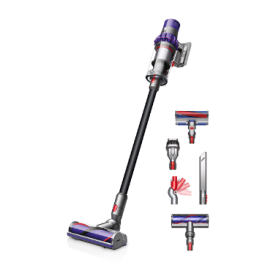
Dyson Stick Vacuums: A Practical Guide
A Dyson stick vacuum is designed to make everyday cleaning more convenient. Its cordless format is easy to manoeuvre around furniture, carry between floors and store when space is limited. Many models can also convert into handheld vacuums, making them useful for cleaning stairs, upholstery and car interiors.
What to consider when choosing a model
Dyson offers several stick vacuum models, and features vary between them. Before choosing one, think about the size of your home, the types of flooring you have and how often you expect to use the vacuum.
- Battery life: Check the stated run time and remember that it can vary depending on the power mode and attachment used.
- Floor types: If your home has a mix of carpets and hard floors, look for a model and cleaner head suited to both.
- Weight and handling: Consider whether you will be carrying the vacuum upstairs or using it for longer cleaning sessions.
- Dust capacity: A smaller bin may need emptying more often, particularly in busy households.
- Attachments: Tools for crevices, upholstery or pet hair can be helpful, but the accessories supplied differ by model and package.
Everyday cleaning and convenience
The main appeal of a cordless stick vacuum is that it is ready to use without plugging in and moving a cable from room to room. Its slim design can also make it easier to reach beneath some furniture and clean narrow spaces. When converted to handheld mode, it can tackle smaller jobs such as crumbs on a sofa or dust in a car.
For larger homes, it is worth planning how you will use the vacuum. A stick vacuum can be convenient for regular, quick cleaning, while the battery capacity and bin size may influence how suitable a particular model is for cleaning an entire home in one session.
Looking after your Dyson stick vacuum
Regular maintenance helps keep a vacuum working as intended. Empty the bin when needed, clear tangled hair and fibres from the brush bar, and clean washable filters according to the instructions for your model. Allow filters to dry fully before refitting them. It is also sensible to check the manufacturer’s guidance before washing any part or removing a blockage.
Battery performance can vary with age, use and power settings. Charging and storage recommendations may differ between models, so consult the user manual for advice specific to your vacuum.
Is a Dyson stick vacuum right for you?
A Dyson stick vacuum may suit people looking for a cordless cleaner that is easy to grab for day-to-day jobs. It can be particularly useful in homes where portability and convenient storage matter. The best choice depends on your cleaning routine, flooring, budget and the features you will genuinely use.
Compare the specifications of the models available and check what is included in the package before buying. Paying attention to run time, weight, attachments and maintenance requirements can help you choose a vacuum that fits your home.
Essential FAQs for Dyson Stick Vacuums: Battery Life, Maintenance, and Best Use Practices
- How long does the battery last on a Dyson stick vacuum?
- How do I clean the filter on a Dyson stick vacuum?
- Can I leave my Dyson stick vacuum on charge all the time?
- Why is my Dyson stick vacuum losing suction?
- How do I empty the bin on a Dyson stick vacuum?
- Which Dyson stick vacuum is best for pet hair?
- Can a Dyson stick vacuum be used on both carpets and hard floors?
- How often should I replace the battery on a Dyson stick vacuum?
How long does the battery last on a Dyson stick vacuum?
Battery life varies by Dyson stick vacuum model, cleaning mode and attachment, so check the specifications for the model you own or are considering. The advertised run time is generally the maximum in the lowest-power mode; using higher suction settings or a motorised tool can shorten it considerably. For longer cleaning sessions, use a lower setting where suitable and keep the battery charged according to the instructions.
How do I clean the filter on a Dyson stick vacuum?
To clean the filter on a Dyson stick vacuum, first switch off and unplug the charger, then remove the filter following your model’s instructions. Rinse it under cold water, gently squeezing the water through until it runs clear; don’t use detergent or put it in a dishwasher or washing machine. Shake off excess water and leave the filter to air-dry completely for at least 24 hours before refitting it—never use a tumble dryer or direct heat. Filter removal and care can vary by model, so check your user manual for specific guidance.
Can I leave my Dyson stick vacuum on charge all the time?
Yes, most Dyson stick vacuums are designed to remain on their charging dock when they’re not in use, so they’re ready for your next clean. The charging system manages the battery once it is fully charged, but recommendations can vary by model. Check your vacuum’s user manual for model-specific guidance, and store and charge it in a cool, dry place.
Why is my Dyson stick vacuum losing suction?
A Dyson stick vacuum may lose suction if the bin is full, the filter needs cleaning, or a blockage has formed in the wand, cleaner head or airways. Hair and debris tangled around the brush bar can also affect cleaning performance. Empty the bin, check for blockages and clean the filter as instructed in your model’s user manual, making sure it is completely dry before refitting. If suction remains weak, check the cleaner head and seals for damage and contact Dyson support for advice.
How do I empty the bin on a Dyson stick vacuum?
To empty the bin on a Dyson stick vacuum, switch it off and hold it over a household bin. Depending on the model, press the bin release or pull the emptying lever to open the base and release the dirt. Keep the bin low in the household bin to help contain dust, then close it securely before using the vacuum again. The mechanism varies between models, so check your user manual if you’re unsure, and never wash the bin unless the instructions say it is washable.
Which Dyson stick vacuum is best for pet hair?
For pet hair, choose a Dyson stick vacuum with a motorised cleaner head and anti-tangle features; a Hair screw tool can also be useful for removing hair from upholstery and stairs. Models such as the Dyson V15 Detect or Gen5detect may suit pet-owning households, but the best option depends on your flooring, budget and the attachments included with the specific model. Check the product specifications before buying, as features and accessories can vary.
Can a Dyson stick vacuum be used on both carpets and hard floors?
Yes, most Dyson stick vacuums can be used on both carpets and hard floors, although the best results depend on the model and cleaner head. Some models automatically adjust suction or brush-bar settings, while others may require you to change the mode or attachment. Check the product specifications and use the recommended settings for your flooring to clean effectively and help protect delicate surfaces.
How often should I replace the battery on a Dyson stick vacuum?
There’s no fixed schedule for replacing the battery on a Dyson stick vacuum; its lifespan depends on the model, how often it’s used and how it’s cared for. Replace it when you notice a significant, persistent drop in run time or the vacuum no longer holds charge, after checking the battery and charging guidance in your user manual. Always choose a compatible replacement battery and follow Dyson’s instructions for fitting and disposal.
Tags: battery life, battery performance, brush bar, cleaning modes, cordless vacuum, dust capacity, dyson stick vacuum, everyday cleaning, filter maintenance, floor types, handheld vacuum, home cleaning, motorised tools, run time, storage convenience, suction settings, user manual, vacuum attachments, vacuum specifications, washable filters, weight and handling