
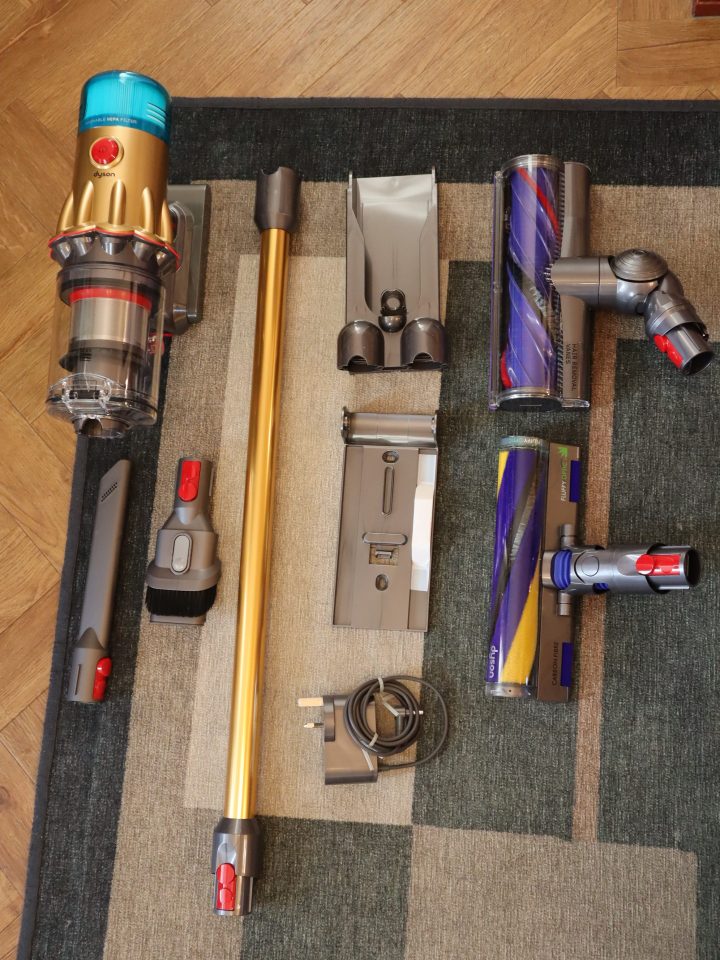
Dyson V12 Detect Slim: A Closer Look at This Cordless Vacuum
The Dyson V12 Detect Slim is a lightweight cordless vacuum cleaner designed for everyday cleaning around the home. It combines a compact format with features intended to make dust and debris easier to spot, collect and monitor. As with other cordless vacuums, its suitability depends on your flooring, home size and cleaning habits.
Features at a Glance
Illumination to Reveal Fine Dust
Selected V12 Detect Slim models include a laser-equipped cleaner head that illuminates fine dust on hard floors. This can make otherwise difficult-to-see particles more visible while you clean. The feature is designed for suitable hard-floor surfaces and may not be included with every version.
Particle Detection and LCD Display
The vacuum’s sensing system analyses particles as they pass through the machine. On compatible models, an LCD screen displays information about the cleaning session, including particle data and remaining run time. This offers a useful indication of what the vacuum is picking up, although the display is not a substitute for a full measure of household cleanliness.
Lightweight, Cordless Design
The V12 Detect Slim is made for flexible cleaning without a power cord. Its relatively lightweight design can be helpful when cleaning stairs, furniture and areas above floor level. A wall-mounted dock can also provide a convenient place to store and charge the machine, depending on the package supplied.
Button-Controlled Operation
Unlike some cordless models that require the trigger to be held while vacuuming, the V12 Detect Slim uses a power button. This may feel more comfortable during longer cleaning sessions. It typically offers different power modes, allowing you to balance cleaning performance and battery use.
How Does It Clean?
The V12 Detect Slim is intended for use across a range of household surfaces. Its cleaner heads and accessories can help with hard floors, carpets, upholstery and awkward corners. The exact tools included vary by model and retailer, so check the product listing carefully before buying.
Like most cordless vacuums, the V12’s run time depends on the selected power mode, the cleaner head and the type of surface being cleaned. Maximum quoted run time is generally measured in a lower-power setting, so it may be shorter when using a more demanding mode or powered attachment.
Who Might Find It Useful?
The Dyson V12 Detect Slim may suit households looking for a cordless vacuum that is easy to manoeuvre and offers features for spotting fine dust. Its compact design can be particularly appealing in smaller homes or for quick, regular cleaning. People with larger homes, extensive carpeted areas or a preference for longer cleaning sessions may also wish to compare battery capacity and bin size with other models.
Points to Consider Before Buying
- Model differences: Names and included accessories can vary, so compare the contents of each package.
- Battery life: Actual run time varies with the power mode and attachments used.
- Bin capacity: A compact vacuum may need emptying more often during larger cleaning jobs.
- Ongoing care: Regularly emptying the bin and cleaning the filter, following the manufacturer’s instructions, helps maintain performance.
- Price: Compare current prices, warranty details and included tools before making a decision.
Is the Dyson V12 Detect Slim Worth Considering?
The Dyson V12 Detect Slim brings together cordless convenience, a lightweight design and dust-detection features in one compact vacuum. It could be a strong option for people who value easy handling and routine cleaning, particularly on hard floors. Before choosing one, consider your home’s floor types, the accessories you need and whether its battery and bin capacity suit your cleaning routine.
Top 8 Tips for Optimising Your Dysom V12 Performance
- Use the laser floor head on hard floors to spot fine dust.
- Choose Auto mode to adjust suction to the amount of dirt detected.
- Use Eco mode for longer cleaning sessions.
- Empty the bin when debris reaches the MAX line.
- Wash the filter regularly, following your model’s instructions.
- Let the filter dry completely for at least 24 hours before refitting.
- Remove tangled hair from the brush bar after cleaning.
- Keep the V12 away from liquids and hot ash.
Use the laser floor head on hard floors to spot fine dust.
Use the Dyson V12’s laser floor head on suitable hard floors to make fine dust easier to see as you clean. The green laser illuminates particles that may otherwise be hard to spot, helping you identify areas that need extra attention. For the best results, use it in a dimmer room and move the head steadily across the floor.
Choose Auto mode to adjust suction to the amount of dirt detected.
Choose Auto mode on the Dyson V12 to let it adjust suction according to the amount of dirt detected. This can help provide more power where it’s needed while conserving battery on cleaner areas. For the best results, move the vacuum steadily and remember that battery life varies depending on the surface and cleaning conditions.
Use Eco mode for longer cleaning sessions.
For longer cleaning sessions, use Eco mode on your Dyson V12. It uses less battery power than higher settings, helping the vacuum run for longer between charges. Eco mode is best for lighter, everyday cleaning; switch to a more powerful mode when you need extra suction for stubborn dirt or debris.
Empty the bin when debris reaches the MAX line.
Empty the Dyson V12’s bin as soon as debris reaches the MAX line to help maintain effective airflow and avoid overfilling. Switch the vacuum off, hold it over a household bin and follow the manufacturer’s instructions to release the contents. For a cleaner, more hygienic empty, keep the bin opening close to the edge of the bin and avoid touching the dust.
Wash the filter regularly, following your model’s instructions.
Wash the Dyson V12’s filter regularly to help maintain airflow and cleaning performance. Follow the instructions for your specific model, as they explain how to remove and rinse the filter safely. Make sure it is completely dry before refitting it; a damp filter can damage the machine.
Let the filter dry completely for at least 24 hours before refitting.
After washing the Dyson V12 filter, leave it to air-dry for at least 24 hours before refitting it. Make sure it is completely dry all the way through, as a damp filter can affect the vacuum’s performance and potentially damage the machine. Avoid using a tumble dryer, heater or direct heat to speed up drying, and follow the instructions for your specific model.
Remove tangled hair from the brush bar after cleaning.
After cleaning with your Dyson V12, check the brush bar for tangled hair, threads or fibres. Switch off and disconnect the vacuum before removing any debris, and follow the instructions for your specific model. Clearing the brush bar regularly helps it rotate freely and maintain effective cleaning, particularly on carpets and rugs.
Keep the V12 away from liquids and hot ash.
Keep your Dyson V12 away from liquids and hot ash. Never use it to collect water, other liquids or hot embers, as these could damage the vacuum or create a risk of electric shock or fire. Allow ash to cool completely before cleaning it up, and always follow the safety guidance in the user manual.
Tags: battery life, bin capacity, carpets, cleaner head accessories, cordless vacuum cleaner, dyson v12 detect slim, fine dust detection, hard floors, home cleaning, laser-equipped cleaner head, lcd display, lightweight design, model differences, particle sensing system, power modes, price comparison, upholstery, wall-mounted dock, warranty details